Sched
- 4.1
- Rating
- 100.00K
- Installs
- Free
- Price

 Analysis by App-foxy
When I use Sched for an event, I am not looking for another social network or a general calendar replacement. I want one practical answer: what is happening, where it is happening, and when I need to be there. That focused purpose is the app’s biggest strength. It turns an event’s published program into something I can check quickly on my phone instead of searching through a long webpage, a PDF, or a stream of announcements.
Sched is an events app from Sched LLC, available for free and rated for Everyone. It has been around since May 3, 2018, and its Android listing shows a 4.2 average from around 1.6 thousand ratings, with more than 100 thousand installs. Those numbers suggest that it is a familiar companion for people attending organized events, although the experience depends heavily on how carefully each event’s organizers build and maintain their schedule.
A focused event companion rather than a full planning platform
I find it helpful to decide first whether I need a way to consult an event’s program or a broader tool for organizing the whole occasion. That distinction sets up the key question: how well does Sched serve someone who mainly wants to make sense of a published schedule while the event is underway?
You May Also Like

 Blood Strike: 2.5 Anniversary
Blood Strike’s Loadouts Turn Every Drop Into a Tactical Gamble
A close look at Blood Strike’s custom loadouts: how fast access to signature weapons reshapes its battle royale rhythm, rewards preparation, and narrows the gap between fights.

 Pandora - Music & Podcasts
Pandora’s Music Is Easy to Start, but Harder to Recover
Pandora’s strength is its low-effort path from a seed to a station. Its weak spot is how much confidence it asks you to place in connection, setup, and quiet recovery.

 8 Ball Pool
 Is Built on Rivalries, Rematches, and Routine
A close look at the rivalries, rematches, shared routines, and unanswered safety questions that turn a quick pool match into a persistent mobile community.

 Samsung Music
’s Quiet Strength Is Playing What You Already Own
Its reach comes less from spectacle than from dependable access to a personal library. That simplicity is both the app’s strongest retention engine and its ceiling.

 AccuWeather: Weather Radar
AccuWeather Review: A Quick, Clear Forecast for Everyday Decisions
For everyday plans, the best forecast is the one you can understand quickly. AccuWeather makes rain timing, radar, and local conditions easy to act on, with a few trade-offs.

 Hill Climb Racing
Why Hill Climb Racing Still Turns Crashes Into One More Run
A tiny car, a bumpy hill and one more upgrade: Hill Climb Racing keeps resurfacing because its simple chaos makes every near-miss feel personal.
More From Our News Desk



The useful idea behind the app
The central idea is simple: event organizers publish their program through Sched, and attendees use the app to browse it. That distinction matters. This is not an app where I create a complete personal itinerary from scratch, invite friends, manage tickets, or coordinate transportation. Its value begins when an event already uses the Sched system.
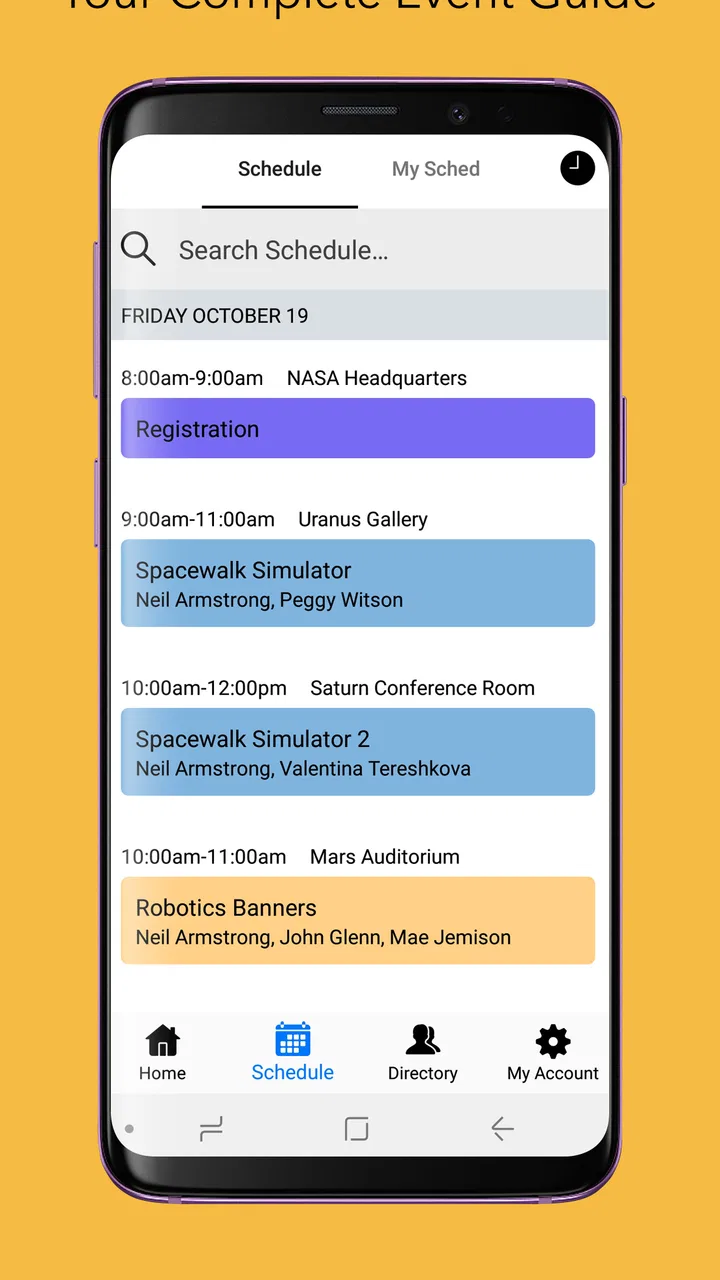
Once the relevant event is available, the app gives me a more convenient way to move through sessions, talks, workshops, or other scheduled activities. Instead of treating the program as one large document, I can approach it as a set of individual entries. That makes a difference at a busy conference, where I may be comparing several sessions that overlap and need to decide quickly.
I especially appreciate this structure when I am already inside a venue. A desktop website is fine while I am researching an event at home, but it is less comfortable when I am walking between rooms with a phone in one hand and a coffee in the other. A dedicated schedule view keeps the task narrow: check the next item, confirm the location, and move on.
Why the schedule format works in real life
A realistic use case is a one-day conference with several tracks. In the morning, I may have a general idea of which sessions interest me, but the practical decisions happen later. One talk runs long, a room is farther away than expected, and suddenly the original plan needs adjusting. Sched is most useful in that moment because it lets me return to the event program without reconstructing the entire day from memory.
Another useful situation is attending an event with a friend or colleague who has different priorities. Rather than forcing both people into one shared plan, I can inspect the program and choose my own next session. The app works well as a personal reference point, even when it is not being used as a social coordination tool.
There is also a quieter benefit: the schedule can reduce the mental load of remembering names and times. At a large event, I might remember that I wanted to attend a particular discussion but forget whether it was scheduled before or after lunch. Having the program organized in one place is more dependable than relying on a screenshot or a note typed quickly during registration.
Three practical habits that improve the experience
My first recommendation is to review the program before arriving, not only when the event begins. This is not because Sched replaces event preparation, but because a schedule is easier to understand when I have time to compare overlapping choices. I can identify the sessions that are essential and leave room for unexpected changes instead of trying to make every decision in a crowded hallway.
Second, I treat the listed location as a planning clue rather than assuming that every room is close together. At a large venue, moving from one session to another can take longer than the schedule suggests. The useful trade-off is to choose a slightly less obvious session when it gives me a more realistic transition between areas. The app helps me see the program, but it cannot remove the physical distance inside the event.
Third, I check the schedule again during the day. Event programs can change, and even when the app reflects the organizer’s current information, my own plan may no longer make sense after a delayed start or a missed session. A quick review before each transition is more effective than building a rigid itinerary hours in advance.
What makes it better than the usual alternatives
The usual alternatives are a mobile browser, a downloadable document, a paper program, or a general calendar app. Each can work, but they solve a slightly different problem. A PDF preserves the official layout, yet it can be awkward to scan on a small screen. A browser page may contain more surrounding information than I need at that moment. Paper is dependable when battery life is a concern, but it is less convenient when the program changes.
A general calendar app is excellent for appointments that I personally create, but it requires manual entry and can become cluttered with sessions I later decide not to attend. Sched sits between those options: it is more structured than a document and less demanding than building a complete calendar manually. That is a meaningful advantage for short events or programs with many parallel activities.
The limitation is equally important. Because the app is tied to event schedules published through Sched, it is not a universal event organizer. If the conference, festival, class series, or meeting I am attending does not use this platform, installing it will not magically import the program. In that situation, the organizer’s own app or website may be the better choice.
The strongest evidence is its narrow focus
In my experience, Sched is at its best when I stop expecting it to do everything. The app’s strength is not a collection of elaborate extras; it is the reduction of friction between me and the event timetable. That narrow focus makes it easier to recommend to someone who needs a schedule companion rather than a large event-management ecosystem.
The Android version listed for the app is 1.60.14 and requires Android 8.0 or later. For someone using a compatible phone, that gives the app a fairly accessible starting point. The free price also removes the usual hesitation around downloading a temporary tool for a single conference or festival. I can try it for one event without treating the installation as a long-term commitment.
Its age rating of Everyone is appropriate for the general purpose of the app. The content is centered on event information, so it feels suitable for a broad audience. Still, the individual event matters: a schedule can belong to a professional conference, a public gathering, an educational program, or another type of organized occasion, and the tone of that event will shape what I see inside the app.
Where the experience can become frustrating
The biggest weakness is not necessarily the interface. It is the quality and freshness of the schedule supplied by the event organizer. If a session moves rooms, starts late, disappears, or changes description, the usefulness of any schedule app depends on how promptly that information is updated. I would not treat Sched as an independent authority that can correct an event’s planning mistakes.
That creates a practical risk for time-sensitive decisions. If I am crossing a venue to attend one particular talk, I still want to pay attention to signs, announcements, and staff guidance. The app can be an excellent reference, but it should not make me ignore information delivered at the venue itself. This is one of the most important trade-offs for first-time users: convenience improves, but personal checking remains necessary.
There is also a difference between browsing a schedule and managing a day. The app can help me understand what is available, but I should not assume that it will handle every part of an event experience. I may still need separate information for transport, entrance arrangements, food, accessibility planning, or communication with other attendees. A person who wants one application to cover all of those areas may find Sched too limited.
Another point is that a schedule can be dense. When an event has many tracks, simply having everything in one place does not automatically make the choices easy. I still need to compare times, think about walking distances, and accept that some sessions will be missed. The app organizes the information; it does not make the event’s underlying timetable less complicated.
Who should use it
I would recommend Sched first to people attending conferences, festivals, workshops, meetups, or other organized events where the host uses Sched to publish the program. It is particularly suitable for attendees who prefer checking information on a phone and who want a clearer alternative to repeatedly opening a long event webpage.
It is also a good fit for casual attendees. Someone going to only a few sessions does not need to create a detailed calendar or learn a complicated planning system. The app can serve as a lightweight reference: find the event, inspect the program, and decide what is worth attending as the day develops.
People who attend multi-track events may get the most value. When several activities happen at the same time, the ability to compare choices in a dedicated schedule is more useful than a simple list of announcements. I also see value for returning attendees who already know the venue and mainly need a quick way to remember the order of the program.
Who may be better served elsewhere
I would skip Sched if the event I care about does not publish its schedule there. In that case, the official website or organizer-provided app is more likely to contain the information I actually need. Downloading a schedule companion before checking whether the event supports it can lead to unnecessary effort.
I would also choose a general calendar app if my main goal were to combine event sessions with flights, appointments, reminders, and personal commitments. Sched is more focused, while a calendar is better for building a complete day around the event. The choice depends on whether I want to browse the official program or manage everything surrounding it.
Likewise, people who need extensive collaboration features may want another tool. If my priority is assigning tasks, coordinating a group, exchanging messages, or maintaining a shared itinerary, Sched alone may not be enough. It can inform my decisions, but it is not the same as a dedicated group-planning workspace.
Questions I would consider before installing
The first question is whether it costs anything to use. Sched is free, which makes it easy to test for a particular event without paying for access to the app itself. The more important question is whether the event organizer has made its program available through the platform.
The second question is whether an older phone can run it. The Android listing requires Android 8.0 or later, so users should check their device before relying on the app for an important event. Compatibility is not exciting, but discovering it at the entrance would be inconvenient.
A third question is whether it replaces the event’s official communications. I would say no. I use it as a schedule reference, while still watching for venue notices and organizer updates. That approach gives me the convenience of a structured program without assuming that a phone display is the only information source that matters.
Finally, I would ask whether it is worth installing for a single day. For me, the answer is yes when the event has many sessions or overlapping tracks. If the program contains only a few activities, a simple webpage or printed handout may be quicker. The app earns its place when the schedule is complicated enough that searching manually becomes annoying.
My final verdict
Sched succeeds because it understands a very specific need: attendees want to consult an event program quickly while moving through a busy day. I like it most as a focused companion for discovering what is on, comparing competing sessions, and returning to the timetable when plans change. Its free access and broad age rating make it easy to approach, while its established presence and 4.2 average show that it has found a useful role for many users.
My recommendation comes with one clear condition: confirm that the event uses Sched and keep reasonable expectations about what a schedule app can control. It cannot fix an outdated program, replace venue announcements, or serve as a complete travel and group-planning system. Within its proper role, though, it is more convenient than a PDF, less laborious than manual calendar entry, and easier to use on the move than a general event webpage.
My bottom line is simple: install it when the event program is busy, divided into tracks, or likely to change during the day. Skip it when you need a universal planner or when the organizer provides a better dedicated alternative. For the right event, Sched is a practical tool that stays out of the way and helps me spend less time searching for the schedule and more time taking part in it.
FAQs for Sched
01What is Sched and how does it work?
Sched is a versatile event management app designed to streamline the planning and execution of conferences, seminars, and other events. It allows organizers to create detailed schedules, manage speakers, and engage with attendees through a user-friendly interface. Users can easily access event information, customize their agendas, and receive real-time updates.
02Is Sched available for both Android and iOS devices?
Yes, Sched is available for both Android and iOS platforms. Users can download the app from the Google Play Store for Android devices and the Apple App Store for iOS devices. This cross-platform availability ensures that all attendees, regardless of their preferred device, can access event details seamlessly.
03What features does Sched offer for event organizers?
Sched provides a comprehensive suite of features for event organizers, including schedule creation, speaker management, and attendee engagement tools. Organizers can customize event pages, send notifications, and analyze attendance data. These features facilitate efficient planning and provide valuable insights into attendee preferences and participation.
04Can attendees personalize their schedules using Sched?
Yes, attendees can personalize their schedules with Sched. The app allows users to select sessions they wish to attend, add them to their personal agenda, and receive reminders. This feature enhances the attendee experience by ensuring they don’t miss important sessions and can easily manage their time during the event.
05Does Sched offer any support or resources for new users?
Sched provides a variety of support options for new users, including a comprehensive help center with guides and FAQs. Additionally, users can contact customer support for personalized assistance. These resources ensure that both organizers and attendees can effectively navigate and utilize the app’s features.
Pros
- Intuitive user interface
- easy to navigate.
- Customizable scheduling options available.
- Seamless integration with calendar apps.
- Notification reminders prevent missed events.
- Cloud sync ensures data is always updated.
Cons
- Limited offline functionality.
- Free version has restricted features.
- Occasional sync delays reported.
- In-app ads can be distracting.
- Requires account for full feature access.

Sched
Gallery